
In the basic setting, without exceptions, only your own work logs are displayed. Work logs of other users are hidden with "hidden".
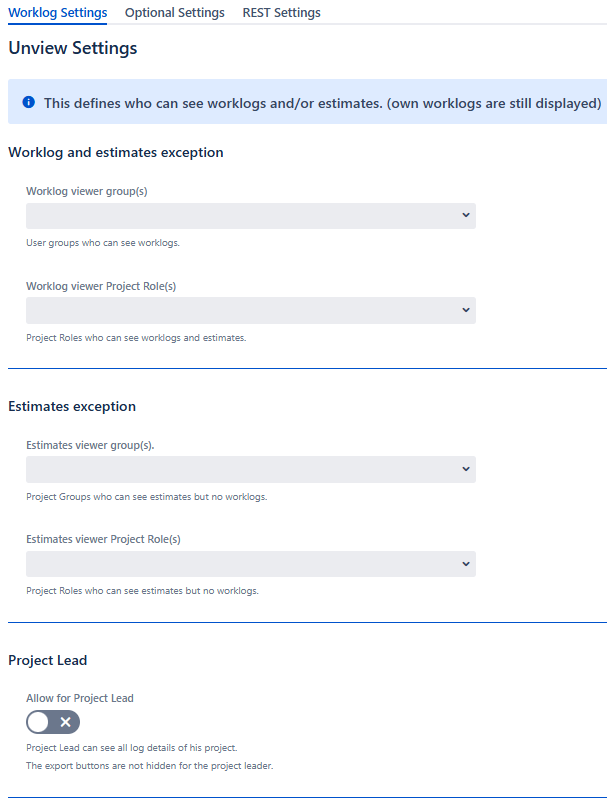
Worklog and estimates exception
Worklog viewer Group
-
Choose the Jira groups that are allowed to see the worklog information.
These users will be able to see the Time Tracking Panel and time tracking issue fields as well.
If the "Block Eport" buttons are disabled under the optional settings, these users can also export.
Worklog viewer Project Role
-
This Project Role offers the same features as the Worklog viewer Group above.
Since it is a project role, it is project specific.
Estimates exception
Estimate viewer Group
-
Choose the Jira groups that are allowed to see the estimates (Time Tracking Panel and time tracking issue fields).
These users do not see other people’s work logs.
Estimates viewer Project Role
-
This Project Role offers the same features as the Worklog viewer Group above.
Since it is a project role, it is project specific.
Allow Project Lead
-
If enabled, project lead can see all work log details of his project team.
The export buttons are not hidden for the project leader.
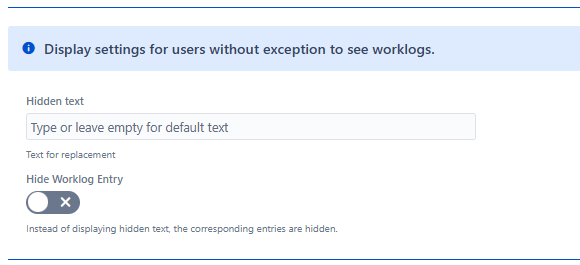
Hidden text
-
Choose the text, which is displayed instead of the worklog entry.
If you leave it empty, a default translated text for "hidden" will be shown.
Hide Worklog Entry
-
The worklogs are hidden in the worklog tab.
Only your own worklogs are displayed.
Fix Special Character Bug
-
Due to a bug in newer Jira Versions, Jira Activity Streams XML is not properly escaped. For older Jira Versions you need to disable in case you experience issues with special characters/German Umlaute e.g. ÄÜÖ.