
The following must be observed
-
If the source groups for the project permissions are to be retained, the product access of the respective source group must be removed before copying the users.
-
The IUM user group must be defined in the global settings of IUM.
-
Users who receive Jira access through another group or suspended users will not be synced into the IUM user group.
-
IUM does not allow more users in the IUM user group than the IUM license permits. In the free version, this is 5 test users.
Any excess users will be removed from the group!The existing normal user group should "not" be selected here.
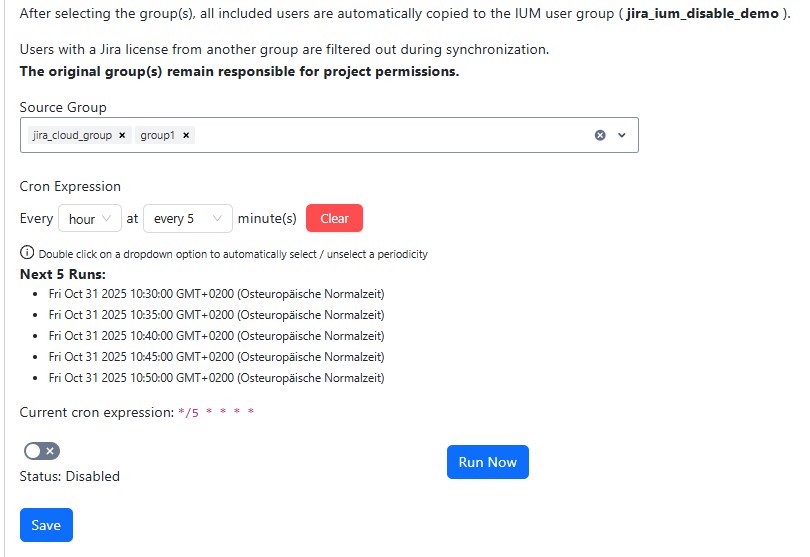
User Management
-
Select source group(s)
-
Set Cron Expression
-
Enable the Usersync
-
Save
-
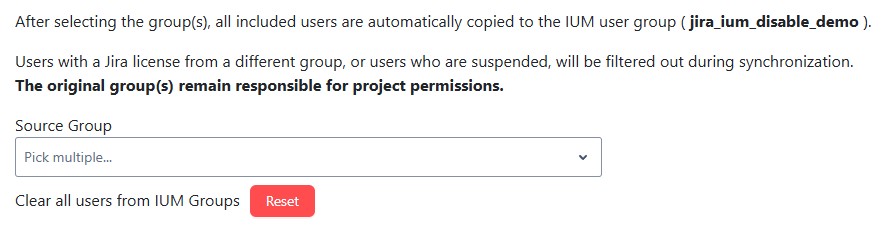
The "Reset" button can be used to remove all existing users from the IUM groups (only visible if no source group(s) are selected).
-
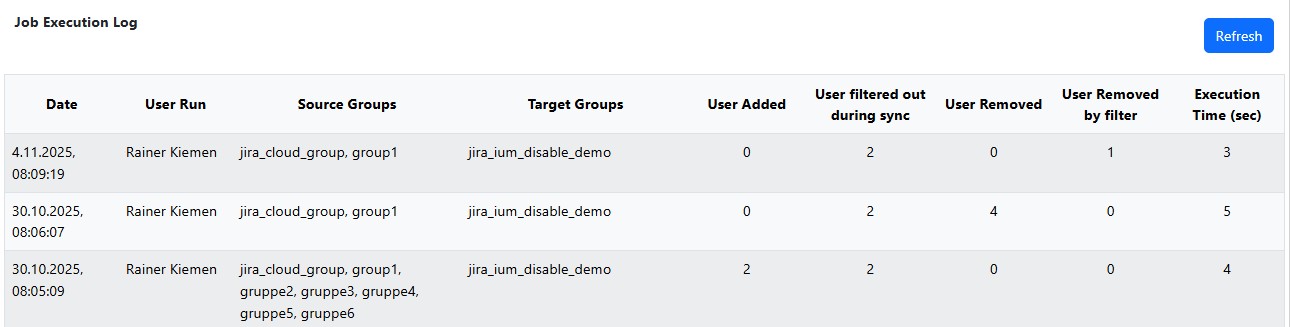
If changes have been made during a sync run, this will be displayed in the job execution log.
-
If users from the ium user group have been suspended in the meantime, or have received a Jira license via another group, they will be automatically removed from the ium user group during the next usersync run.
-
User added
Number of users added to the ium user group during sync -
User filtered out during sync
Number of users who have a fixed Jira license or are suspended and therefore were not synced. -
User removed
Number of users who have been removed from the source group since the last sync and have now been removed from the ium user group. -
User removed by filter
Number of users who were removed from the ium user group because they were suspended in the meantime or obtained a Jira license through another group.